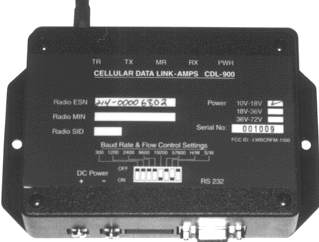
Cellular Data Link CDL 900 Cell Modem

Cellular Modem Access Solution 
(looks and feels like a standard RS 232 AT command compatible modem)
AC or DC power, -30 to +75C temperature rating option

    This low cost combination of a modem & Cell phone is ideal for those
    " remote" sites where a copper phone line is impossible.

    With the cost of cellular service declining a cell modem makes sense for  more and more remote site applications .

    The CDL-900 is designed around the Radio CRM 4100 from Standard Communications. Once interfaced with the 4100, to the user, the entire unit looks like a standard RS 232 AT command compatible modem. This allows compatibility with popular software packages.

    Features

    • Uses AMPS cellular network for data transmission
    • MNP10-EC
    • User friendly modem AT command set
    • Standard RS 232 serial interface
    • Choice of Hardware or Software Flow Control
    • Quiet Mode allows communication with "non-intelligent" machines

    Sample Application Areas

    • Packet Data Radio
    • SCADA and Telemetry Systems
    • Remote gas/water/electric meter readings.
    • Factory Automation systems
    • Vending Machines

    Specfications

    • Air Speed                                                                 up-to 9600 bps
    • DTE Rate                                                                 300, 1200, 2400, 4800, 9600,    19200
                                                                                        57600 bps (switch selectable) 
                                                                                        Auto Detection on receive
    • Data Compression & Error Detection                  MNP2-5, V42, V42bis, MNP 10 
                                                                                        MNP10-EC is supported
    • RF Power Output                                                    0.6 watts 
    • Power Supply                                                          10-18 Volts DC @ 600 ma average  when sending data,
                                                                                        100 ma in the idle mode, 800 ma max at start-up
    • Optional 3 watt output                                           Available soon
    • Interface                                                                   RS 232 Asynchronous
    • Signals supported                                                  TXD, RXD, CD, DSR, RTS, CTS
    • Operating Temperature Range                            -30 to 75 deg C 
    • Size                                                                         2.5' wide by 6" L by 1"H 
                                                                                      (hole to hole 5.5")
    • Optional high-gain Antenna                                 Omni-Directional,  Yagi and panel
    • Optional  DIN rail mounting                                 Optional
    • Custom Configurations and Options

    Your package includes:

    • CDL 900 unit (Radio included)
    • Antenna
    • Flat RS232 Cable
    • Manual

    What you need to provide:

    • Host PC with terminal program like Hyper terminal, Procomm etc
    • MIN & SID information (from your cellular service provider)

    Installation:

    Contact your cellular service provider and register the unit. To register the unit and get service, you will need to provide the cellular operator the ESN number (this is on the label at the top) and also tell them that the unit is class 3 unit (power 600 mw).

    The cellular operator will, in turn, provide you:

      1. MIN (Mobile Number) Number:
      2. System preference: A or B
      3. SID (System ID):

    It is recommended that MIN number be entered in label on the unit.

    First Time Quick Start

     (The CM900 is configured as a DCE (e.g. modem). It talks to a PC through the RS 232 cable.)

    1)       Connect the power supply. The Power LED should be on. Connect the RS 232 cable provided. Connect the Antenna. The unit is ready for operation.

    2)      Configure the serial port to 9600 bps, 8N1 and Hardware Handshaking.

    3)      Allow 10 seconds for calibration.

    4)       Enter AT+TEST<CR>. The unit will respond OK.

    5)      Enter AT+MIN=< the MIN allocated><enter> The unit will respond OK.

    6)      Enter AT+SID=< the SID allocated><enter> The unit will respond OK

    7)     Enter AT+SYS=00 <CR> (for system B only)

              =01 <CR> (for system A only)

              =02 <CR> (SID will determine preferred system, but roaming charge may apply.
                                   This is also called normal mode)

    8) Enter AT+MODE=02<CR> The unit is now set for data mode.

    9) Enter AT+SER? <CR> The unit should respond with SERVICE AVAILABLE.

    Please note that radio does NOT have to configured every-time. The above information is stored in the Radio’s non-volatile memory.

    Operation:

    The CM900 (hereafter referred to as modem) is always in one of the two states: the command state or the on-line state. The modem assumes the Command State when power is applied. This state allows the modem to be configured for the particular application. In the Command State, all inputs from the PC are treated as commands. The modem may be set to the on-line state in which all inputs form the PC are treated as data to be shipped over the airwaves and all inputs from the airwaves is treated as received data from the remote end.

CELLULAR MODEM

ARC Electronics Modems


Contact

Experience The Difference !!!!

Get-A-Quote

 
   Home  Company   Hot Products   Get-A-Quote   Repairs   Contact   Sale Items  Services  Tech Info Used Equipment  Warranty Credit Returns  Site Map
     

1-888-4-WAN-LAN
1-888-492-6526

© 2008 Data Connect Enterprise
3405
Olandwood Court
Olney, Maryland 20832